
Table of Contents
February 2026 newsletter
Our next Folk open house will be on Monday, March 30, in our new studio (not Hex House) in Williamsburg, Brooklyn. RSVP here:
We're a nonprofit doing unique open-source research on physical computing and programming – please consider sponsoring us:
What we've been up to
Folk February
- Daniel Pipkin kicked off Folk February, a month-long challenge inspired by Inktober where community members are encouraged to build and share a prompt-based Folk program each day.
- Rob Fielding participated with an impressive streak of projects that pushed the graphical capabilities of Folk2:
Sound wheel
- Andrés has been working on on a “sound effect wheel” — really, an octagonal wheel made of tagboard with Folk programs on each of the sides that trigger a
.wavsound file. It's been fun to think of alternative ways of triggering programs by using paper engineering, and to have more instrument-like capabilities.- A little stop motion putting together the side of the octagon:
- Here's a video of the sound wheel running on folk-hex:
- Here you can see the 3D output of the quads on Omar's laptop, and you can see the shape of the wheel show up in the cluster of purple programs on the left:

General system improvements
- Omar: Improved error catching so we report syntax errors and errors whose home line is in a library callee and not the program itself
-
- Caused a nasty bug where editors would interfere with each other because we weren't doing the join query properly, so had to fix that after it came up during the open house
- Omar: Restored support for color in camera slices (by cutting and unwarping them out of the JPEG instead of the black-and-white decompressed detection frame)
- (motivated by wanting color images for OCR and text detection)
- See the colored and perfectly unwarped camera slice here (it's not forced to be an axis-aligned bounding box anymore):
- Omar: Loosened json::decode from Jim Tcl so that it can parse ''null'' and support root elements being strings/numbers
Per-program redirection/capture of stdout and stderr
Omar: All programs now have stdout and stderr directed into 'local' stdout and stderr streams instead of getting mingled in the terminal output. (Folk's terminal output is now pretty minimal/clean.)
I've added new Web index page to replace the statements page. This page is like what used to be at /programs, except you can now browse stdout/stderr and live errors for each program.


(Still need to make this update live and make it sort/filter-able so it's easier to view output you care about.)
Also added a new CLI output that lists programs and program statuses as you boot (if you're running from a real terminal), since there's no longer any puts/printf output to the actual terminal.
How the redirection works
The files are just normal files in /tmp created for each distinct $this:

At first, I was trying dup2 to replace stdout and stderr with the program-local files right before we eval any When body on a thread. But those file descriptors 1 and 2 are process-wide, so multiple threads can't have different stdout and stderr at the same time! so we'd get weird cross-printing into the wrong streams when programs were executing in parallel.
We needed thread-local stdout and stderr. We could hook puts or the aio system in Tcl to use the thread-local file descriptors. But… we also want C FFI and C library output to come out on the program-local stdout and stderr, and those don't go through Tcl at all, so the hooks wouldn't apply there.
So, a really weird hack: use library interposition (LD_PRELOAD on Linux, dyld interposing on macOS) to replace all the file write operations so that if the write is to stdout or stderr, we look up the latest thread-local file descriptor in a thread-local variable and use that. Works fine on both macOS and Linux so far.
Random things we had to deal with:
- we occasionally want user code to be able to print to real stdout and stderr (for creating the terminal UI, for example) – issue for a while was how to reopen real stdout and stderr on different fds so you can write to them separately without being interposed. Can't reopen /dev/fd/1 and /dev/fd/2 as you might think, because it's a socket on systemd, so it broke Folk in systemd. And it's not correct after initial boot if you do it on each interpreter (since new interpreters may come online later). Have to dup real stdout and stderr at C level once, globally.
- have to specifically apply output redirection to Tcl
exec ... &so that the subprocess gets plugged into the program-local stdout and stderr instead of the global ones (this is used for stuff like running Python and running curl in background) - Can't open the .stdout and .stderr files per-thread on demand and store them globally in each Tcl interpreter, because then you have 1000+ open file descriptors (each program often gets its stdout/stderr reopened across multiple threads), which strains the default OS settings.
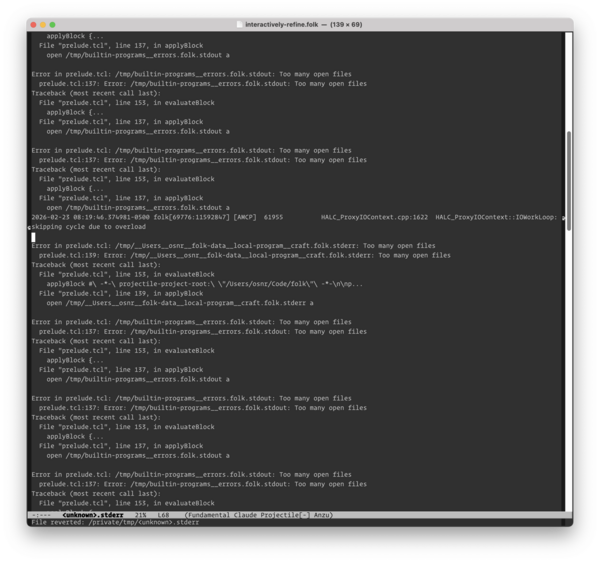
- solution: do the fd tracking at C level so you have one fd per file, so you go from ~1000 open fds to ~300 open fds

Motivation
Reduce confusion
We've gotten a lot of feedback from new users who are confused by stdout/stderr error messages when Folk starts up; users aren't sure how to filter for what messages are actually relevant to problems they have. (There's a lot of noise from modules that aren't important or haven't been updated to folk2 yet, and warnings about stuff that doesn't matter.)
Now you can see that some warnings or errors are from the print subsystem or a debug view and not affecting why you can't calibrate.
Native editing experience
Personally, I also don't like how much I've been leaning on stdout/stderr/puts/printf when writing Folk code (both at system level and at user level). It feels too much like traditional programming, involves me staring at laptop terminal, etc. Now that we control the streams, we can have per-program physical views of the streams (adjacent to the physical editor), we can notify only when a program actually has output, stuff like that.
Communicate the independence of programs
I've wanted a bootup experience for Folk that better communicates that the system is made of a bunch of independent programs that are all starting up and compiling themselves, and even if some don't work (because something's weird about your computer, you didn't install dependencies, whatever), the rest of the system is still OK, and you can fix only the parts you care about if you want.
You get a sense of the non-monolithic design of the system and a sense that progress is happening even before the projector lights up and/or you look at the web page (which can take a while). I'm reminded of my friend Lucas talking about how a lot of the appeal of his zerobrew project was the fast spinners and progress bars when you install something, creating an immediate sense that it's doing stuff and doing it fast.
Cristóbal has wanted us to distribute Folk as more of just a language runtime without the physical computing stuff upfront, and this is a step toward doing that as well.

Python FFI and recognition models
Omar: Last month, we were starting to look at handwriting recognition in system, but realized that you also need text detection (and there are other models we want to try), which suggests that we should have a more general FFI to talk to these models.
So I implemented a Python FFI this month. It works a lot like the C FFI, except you do [Uvx] instead of [C] to create the object, you can install arbitrary dependencies by passing dependency arguments to uvx, and you don't issue a compile command and make a separate library object (you can eval/exec directly on the Python object, or def functions on it and then call them).

Simple program that uses underground to show next northbound trains at our local stop (poor photo, but gives you an idea of the output train times, at top):

# Grand L northbound trains

set py [Uvx --with underground]
$py exec {
    from underground import SubwayFeed
    feed = SubwayFeed.get("L")
    l = feed.extract_stop_dict()["L"]

    import json
}
set stopN [$py eval {json.dumps(l["L25N"], default=str)}]
Wish to draw text onto $this with \
  text [join [json::decode $stopN] \n] \
  x 0.01 y 0.01 scale 0.01 anchor topleft
You can also define functions in Python with typed arguments and call them like you would C FFI functions, which is how you use recognition models (call a Python function with an Image argument from camera slice/frame, run the model in Python, have it return boxes or recognized text or whatever to Tcl).
Messaging between Python and Folk
The Uvx FFI spawns a subprocess to run uvx which runs python, so each Python instance can have its own dependency set and execution context. How do we talk to the subprocess?
We need a way to talk to the subprocess that is fast (since we may send it whole camera frames), that can be accessed from multiple Folk worker threads at the same time, and that is 'robust' if a Folk worker is killed mid-transmission (because it got flipped over or something).
We also need basic message framing to send message length and binary body, maybe send different fields or elements if it's a structured Tcl type or image, etc. (can't just be a raw binary stream like TCP without message boundaries, and don't want something with delimiters since we're sending binary data for Images)
There are two parts to figure out: how do we serialize/frame data (JSON, msgpack, zeromq multipart, etc), and how do we transport the data (TCP, zeromq, Unix domain socket, stdin/stdout, shared memory, etc).
I was going to do a whole msgpack thing to automatically and compactly translate data between Python and Tcl (so it could support binary data like Image data), but we don't really need it right now. JSON is okay as serialization format, since Python calls are rare-ish (once per frame, usually) and data not that complex/big. We have support for separate Python/Tcl serializer/deserializer for binary data like Image that you just implement manually. It doesn't support nesting Images into lists or whatever, but that's ok for now (not that different from C FFI).
(Fortunate that we didn't try to implement that serialization, because even looking at the JSON decode/encode that we end up using for most simple data, it's more complicated than you think – you actually sort of need a schema to translate arbitrary Tcl data into JSON, because it's ambiguous whether stuff is a string, dict, or list. Great that Jim's json encode already has a schema language that you can just specify as the argtype when you define a Python function, and we don't have to make it up ourselves.)
For transport, I started out excited about zeromq:


but ended up replacing it with plain Unix domain socket to save on a dependency (we weren't using most of it, and it has transitive dependencies).
(Part of why I was excited about both msgpack and zeromq is there seemed to be reasonable Python and C bindings for both that were used to transmit images and stuff.)
A weird thing is that zeromq did handle threading on its own, and now we have to use Python threading on the Python side.
Text detector
Here's the binding to the CRAFT text detector model. It's pretty simple!
Folk code to bind to CRAFT text detector
    set py [Uvx --with pillow --with "git+https://github.com/osnr/craft-text-detector.git"]
    defineImageArgtype $py

    $py exec {
        import torch
        import numpy as np
        from craft_text_detector import Craft
        import time

        if torch.cuda.is_available():
            device = "cuda"
        elif torch.backends.mps.is_available():
            device = "mps"
        else:
            device = "cpu"

        craft = Craft(output_dir=None, crop_type="box",
                      link_threshold=0.1, device=device)
    }
    $py def detectTextBoxes {Image image} {
        image_np = np.array(image)

        start_craft = time.time()
        result = craft.detect_text(image_np)
        boxes = result["boxes"]
        craft_time = time.time() - start_craft

        print(f"craft: Detected {len(boxes)} text boxes ({craft_time:.3f}s)",
              file=sys.stderr, flush=True)
        return boxes.tolist() if hasattr(boxes, 'tolist') else boxes
    }

    fn CRAFT {im} { return [$py detectTextBoxes $im] }
    Claim the CRAFT text detector is [fn CRAFT]
and with this in place, a program can just When to get the detector function and call it on a camera frame / camera slice Image and get back a list of text boxes. (The FFI will automatically convert any Python list/dict/etc into a Tcl object by using JSON serialization, and vice versa, in arg or return types.)

(I do wonder if this binding even needs to be built into Folk or if it should just be part of the user program on the table, it's so short… and it would've been nice, at the last open house, if people could just see this caller implementation on the table, rather than having to take our word for it.)
Laptop test
Text detection running in test on my laptop – see how it outlines the text in the image in blue:


Table test
Text detection running on a table as I write:
We like that it feels like a 'lens' that you can move around that keeps working as you move it:
Text detection + handwriting recognition
Here's the binding to the TrOCR text recognizer.
TrOCR binding side-by-side with the CRAFT text detector binding:

This doesn't work great yet – I wonder if we need higher resolution or what – but here it's finding the slice where “text” is handwritten and then OCRing it:
Image segmentation using SAM2
I don't have a good photo or video of this yet (needs to be set up in the new space and have more interesting demo built around it, maybe whole table instead of camera slice), but here's the binding for SAM2.
Would be useful for pointing to an arbitrary object and tracking or projection mapping it.
''Expect'' experiment
Omar: I started experimenting with ''Expect'', which would let you imperatively await a statement as a dependency, without needing to nest the rest of your program into a When block.

(The naming is sort of inspired by Tcl expect and how, as I understand it, it lets you wait on an external process until it matches some pattern.)
The main motivation here is that I want reactive expressions for handwriting input – I want to be able to implement Blank2. Each Blank2 call should be reactive without requiring that you nest the rest of the program in a When.

Proposed implementation / pseudocode for how my branch currently works:

Here's a test:

The branch is a bit broken, but it would be nice to get back to it sometime.
I think it aligns well with the new emphasis on displaying individual program statuses – even though it may be almost equivalent to When, Expect encodes that a program has a hard dependency on a library or bit of state, and if an Expect hasn't matched properly, I think you could show the program as not running properly (yellow or red status). Hard to infer that from a When, since it's generally OK/'normal' if a When has 0 results.
Interactive calibration refinement
Omar: As the text recognition stuff has come online (and looking at other people's videos of their setups above), I've gotten frustrated with how calibrations are often a bit off. I want to precisely outline text that you're writing, or paragraphs in books, or whatever. (And I want to bring back tag masking so programs don't self-interfere.)

Have been picking back up what used to be table-refine.folk and is now ''interactively-refine.folk'' – a post-calibration refinement step, basically a new kind of calibration that is interactive or 'online'. You set the calibration board in a pose and the system projects and adjusts its full end-to-end calibration for a while until it can nail that pose:
This uses the Levenberg-Marquardt optimization that we also use in the traditional calibration, but in the middle of the evaluation function, we project with the current candidate calibration and fully loop that through the camera and tag detector, so we get a 'real' end-to-end error.
It still requires that you do the traditional calibration step first, because it needs a guess that's good enough (lets it already see enough tags) that it can refine it.
Various issues
Originally, problem was I typoed and wasn't giving enough residuals (need more residuals than parameters), so the system was underdetermined and would fail:

For a while, problem was LM step size wasn't large enough (it wasn't tuning the parameters by a big enough offset, like 0.00001 instead of 0.001), so the changes to estimate gradient were below the noise floor of tag detection, so it couldn't estimate the gradient and know which direction to improve things.
You can see that the refinement improves a lot now (orignorm → bestnorm):

Hamish Todd's talk
Hamish Todd gave a talk in our Discord about 3D interaction and some perspective problems with tabletop projection that he's been exploring. We had a good discussion about what's currently possible or interesting to do with the system.

Outreach
- Our friend Jenny visited briefly:

Open house
- We hosted our last monthly open house at our Hex House studio on Thursday, February 26th – a few of Andrés' students from SVA stopped by and we had fun demoing the animation program, as well as segmentation that Omar's been working on, and a sound-effect wheel that Andrés has been making:


Atomically bug
Our friend Peter Walkington found a bug with Atomically that shows up after a little while on this program:

It should alternate between :O and :), but it ends up in this superposition where both :O and :) are visible at the same time:

It looks like we're leaking versions, like we're 20,000 versions behind on item 5 here (1557's clock time):

We saw similar issues with Atomically at the party end of last year – it's nice to have a concrete example and a sense of what the issue is. Need to debug.
What we'll be up to in March
- Our next Folk open house is on the evening of Monday, March 30, at our new studio in Williamsburg (!)
- Move to new studio; set up a lot more hardware
- Omar: Work on interactive calibration refinement to try to get folk-hex as good as possible
- Omar: Fix big new memory leaks and other bugs from open house (atomically stopping convergence over time; crashes)
- Andrés: Seriously add video support back in (i.e. wrap
libavsufficiently to load at least .mp4 files)