
Table of Contents
November 2025 newsletter
Instead of an open house, we'll be having a Folk Computer v2 Launch Party on Friday, December 12, from 6:30pm to 10pm. There will be snacks and beverages, multiple folk2 systems, a short presentation at 8:30pm showcasing what's new in folk2, and we'll officially hit the Merge button at some point during the night!
What we've been up to
Mason's new editor
Mason Jones has been developing a new "code view" system, which we ultimately merged into folk2 and decided to make the main in-system editor, replacing the old editor.folk.
It has many nice features that we've wanted for a while (should also be really useful for editing larger builtin programs):
- Easily edit any existing program on table (puts it into 'edited' state, with a notice in title of when it was edited)
- Can always revert to printed version if you want
- Can print changed program as new tag when ready
Ctrl--andCtrl-=to set font size- Horizontal and vertical scrolling when programs are wider/taller than viewport

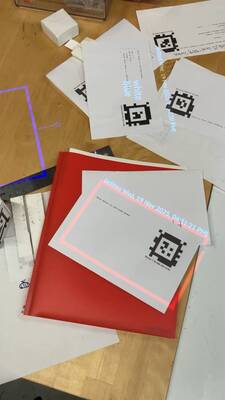
Here we are, testing the code views early on:

We made it automatically make a new-style editor for each keyboard in the same way that we used to automatically make old-style editors.
Omar also made some minor changes: fixed the Enter key and restored editor persistence across crash/reboot (which we've really appreciated since we added it last month).
From the user point of view, the biggest change is that you now need a blank to edit as your starting point to write a new program. But you can also quickly edit existing programs, which makes the system feel a lot more flexible and powerful. (you're not stuck with whatever programs you printed out, and you can 'ask questions' about anything on the table by opening it in the editor)
Fixed title blinking
Using titles to show the “Edited” notice meant we noticed that titles blinking was a real problem.
Debugged it for a while. Found that the display drawlist was empty when blinking out:

Then found that the display drawlist was empty because we weren't able to acquire the collection statement:

Fixed by retrying acquisition of that collection statement until it works, since it should always eventually be present.
Other improvements on folk2
Many small improvements as we use the editor and label more intensively.
- Created /camera live stream page that we can use in both /calibrate and /setup (as opposed to /camera-frame that only shows a static snapshot)
- Would be nice to put camera controls on here
- Replaced ''(keep 10ms)'' with ''-keep 10ms'', which finally makes all Folk command parameters consistent (also consistent with Tcl parameters)
- Auto-shrink labels based on length of longest line – makes label much more usable when feeding arbitrary text / command output into it
- Also: auto-position label slightly lower so it doesn't constantly overlap with tags
- (might be good to break really long lines and mask out tags as well)
- Set timezone on folk-hex, so printed programs have a locally meaningful timestamp finally:
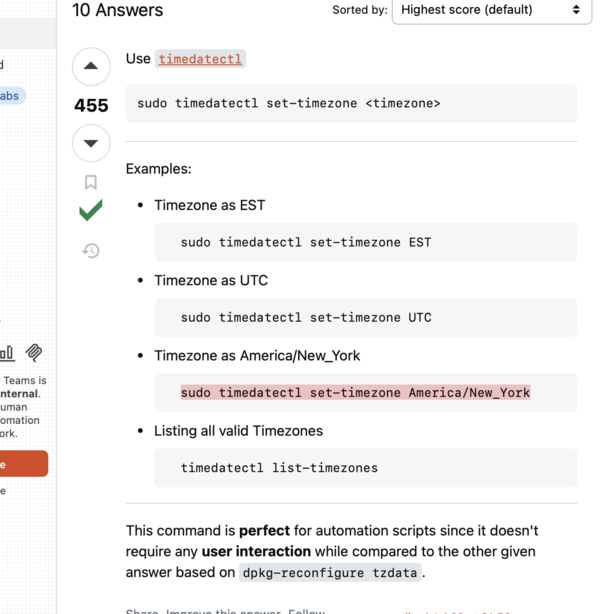
- (motivated by wanting to format and project edit times for live-edited programs after Mason's new editor)
- Here is a nice trick that gives you live-reload on Folk web pages:

New new folk-hex computer
Replaced folk-hex (which replaced folk0 last month) with a newer, faster, smaller computer, the Minisforum AtomMan G7 TI (which we're also calling folk-hex).
(Also looked at a few other mini-PCs. There's powerful and/or cheap stuff out there, but didn't want to wait for shipping and risk a random brand.)
You can see the new folk-hex PC on the top-right here:

The prompt to do this upgrade was that I couldn't get USB3 to work on the old tower folk-hex with our webcam, which meant we were capped at 1080p30 or 720p60, which isn't really acceptable. (720p leads to an uncomfortable level pose detection instability with 3D calibration, in my experience)
USB bus reports – see how the camera is stuck under the 480M bus:


(Ultimately, I think the problem was sort of unrelated to folk-hex itself; it's that the super-long USB extension cable to get from ceiling to floor – where the tower had to live, since too big/heavy to get on ceiling easily, unlike folk0 or new folk-hex – was limiting us to USB3, not anything with the USB or motherboard on the computer, but whatever. The new folk-hex just goes back on the ceiling and uses a normal-length cable.)
Let's wave goodbye to the old folk0 and the old folk-hex:


It was pretty easy to set up new folk-hex this time, thanks to the fixes from this month and last month.
HDMI-CEC
Omar: A surprising rabbit hole every time you set up a new Folk system is how to make it turn on and turn off with one operation each.
You don't want to have to go through a whole checklist every time you enter or leave your office (ssh-ing in, running a command, finding a physical remote control, climbing up to press buttons on projector).
At home, because I have a cheap PC that I don't mind running down, I generally leave the PC on and just toggle the projector off. (the projector is by far the noisiest / loudest / most power-consuming part)
Here, I'd like to not leave the fancy PC on and doing detection and compute 24/7, so I wanted a way to suspend the PC with a Folk program and suspend the projector automatically (and same for resume), which we had in folk0 through HDMI-CEC and a BIOS option to turn off display on PC suspend. (PCs generally wake from suspend when you press a key on a keyboard.)
Unfortunately, Nvidia GPUs rarely/never support HDMI-CEC through their HDMI ports. You can buy a USB adapter that breaks out the CEC communications, but they're like $50 for some reason.
So, a hack that uses parts I already had lying around. A Pi Zero W (which does have HDMI-CEC support) folk-hex-cec is permanently connected to the other HDMI port on the projector and permanently powered by a powered USB hub.

It's on the Wi-Fi, so we can ssh into it from folk-hex and run commands to turn the projector off and on.
Then this systemd service, /etc/systemd/system/suspend-resume.service, which is set up here to run on suspend and stop on unsuspend:
[Unit]
Description=Suspend/Resume Handler
Before=sleep.target suspend.target hibernate.target hybrid-sleep.target
Before=network.target systemd-resolved.service avahi-daemon.service
StopWhenUnneeded=yes

[Service]
Type=oneshot
RemainAfterExit=yes
ExecStart=/usr/local/bin/suspend-resume-handler.sh pre
ExecStop=/usr/local/bin/suspend-resume-handler.sh post
TimeoutStopSec=30

[Install]
WantedBy=sleep.target suspend.target hibernate.target hybrid-sleep.target
And this helper script, /usr/local/bin/suspend-resume-handler.sh, which runs the actual remote commands to tell the Pi to standby and resume the projector on PC suspend/resume:
#!/bin/bash
case $1 in
    pre)
        # Commands before suspend
        echo "Triggering CEC standby..."
        ssh [email protected] -- "echo 'standby 0' | cec-client -s -d 1"
        echo "Triggered CEC standby."
        ;;
    post)
        # Commands after resume
        echo "Triggering CEC on..."
        ssh [email protected] -- "echo 'on 0' | cec-client -s -d 1"
        echo "Triggered CEC on."
        echo "Restarting Folk..."
        systemctl restart folk
        echo "Restarted Folk."
        ;;
esac
New camera
Omar: I've been wondering why our calibration on folk-hex/folk0 has consistently not been that great (1cm error or worse), while I can calibrate Folk really well on my home system.
Maybe it's the webcam? At Hex House, we've been using a Logitech BRIO 4K. At home, I've been using a NexiGo N980P. Maybe the BRIO 4K has too much distortion or too wide an angle or something.
So Brian and I set up a NexiGo webcam on the side. We had to chain a couple arms together (it has to hang a lot lower than the BRIO 4K, I think, which does suggest different optics).
Tried a few different of combinations of different arms to make sure it was really rigid and wouldn't droop over time, and wasn't too high up.


Exciting
The performance improvements haven't been that big so far, but it's kind of useful in itself to know that we're not limited by PC performance. The computer is more than fast enough for the fundamental operations we're doing (camera capture, tag recognition, evaluation) – if it's slow, it's because we're scheduling poorly or otherwise being inefficient.
The new folk-hex has a decent GPU, so I also want to maybe try some machine learning models to add new interactions (object tracking, segmentation, handwriting recognition). (It could even be a server for other systems at Hex House – gadgets, other PCs – that have less compute locally.)
TrOCR
Omar: Inspired by our new PC experiments, I spent some of a day trying TrOCR, which (trocr-base-handwritten) seems like the best system out there for local/fast handwriting recognition? (if you want to do it continuously and for free and low-latency-ish, as opposed to just feeding to a large language model remotely and waiting several seconds)
Tried recognizing this simple JPG:

(so we're aiming at one-line handwriting for now, like text fields, not arbitrary handwriting on a whole camera frame – that'd involve other problems like handwriting detection and alignment that are surprisingly hard in their own right, as far as I can tell.)
Basic usage:

Here's a benchmark script running on my personal M1 MacBook Pro – 0.3s on CPU and 0.15s with GPU/Metal acceleration:

It runs with okay speed even on my $150 home PC (1.5s CPU, 0.5s GPU), GPU-accelerated with OpenVINO (my home system has an Intel Alder Lake chipset):

Hoping it's even faster with CUDA or whatever on folk-hex.
But even if not quite 60Hz real-time… that might be okay if we just run it on major inter-frame changes, or on button press, or something…
(Remember, we want built-in handwriting recognition so we can do pen programming, writing in blank fields in programs, etc. It's just a new mode of interaction beyond moving sheets of paper around.)
Experimental interpreter
Mason: I've been nerd-sniped by the jimtcl interpreter for some time now, ever since I attempted to make jimtcl thread-safe (which did work, but unfortunately it ended up being slower than the current approach). It's continued to bug me, so I finally bit the bullet and started hacking on a new tcl interpreter. The interpreter heaps are designed to be able to safely share objects between threads by freezing them right before they're shared. There's some other things I'm trying out too to reduce how much indirection there is (which oh my gosh there's a lot in jimtcl).
It's still far from finished (about 7,500 LOC vs Jim's 17,000), but I've gotten the object representation working, and I'm about a 3rd of the way through implementing the interpreter. There's a lot of other commands that need to be implemented after that (especially expr), but there's still a chance it'll work at some point, lol. The current code is here.
Gadget
Breakage of gadget-platinum SD card
On November 12, when Andrés was about to give his talk at Parsons, our main gadget2 (gadget-platinum) suddenly wouldn't boot.
Omar did some debugging, took out the SD card, tried to fsck it, and found that it wasn't able to be fixed. Even booted up a Linux VM and attached an SD card reader and mounted it and looked at the partition table:

Conclusion: "It was accepting writes without error, but it wasn't actually writing the data to the card." “The number of read/write cycles sd cards can endure is substantially lower than most other mediums considered 'read/write'. When that has been exhausted, the card will go into read only mode, but won't inform you of such. Lots of things will think they're writing to the card thanks to OS caching, etc., but nothing ever sticks.”
I think this probably would happen to any SD card after long enough. We should really switch to NVMe. We were in a rush and had an extra SD card lying around, so I was (luckily) able to image the old SD card, flash it to new card, trash the old card, and now gadget-platinum works fine again. Anyway, this is something to watch out for if you're using an SD card in a gadget.
New mini-gadget
Omar: I've been assembling a new battery-less stereo gadget (old design, not gadget2) for myself at home out of some of the unused parts (Ultimems devkit, Raspberry Pi 5, two Pi cameras).


Changed the model slightly to accommodate 2 Pi cameras instead of the ELP stereo USB camera. I haven't put the front panel on yet (and it doesn't even have a back panel).
I'm excited to calibrate and try this, and maybe put it on robot arm.
Daniel-Omar pairing
Daniel Pipkin and Omar have been pairing on fixing some of the remaining annoyances in folk2. (We've also been chatting about new printing functions.)
Daniel's gadget:

These have just been on the meeting room channel in Discord – would love for other people to watch / join in on the pairing, or also pair with us. (I'm thinking of eventually streaming, too, especially once we're doing more work in the system itself.)
ForEach! control structure support
To work toward Daniel's interest in adding new printing features, we refactored the printing query/control flow to use ForEach!.

But ForEach! didn't support early return, continue, etc like you would hope that a loop would, so we fixed that. It also had terrible stack traces, which we fixed. (also hopefully will help web handlers have better stack traces)
-atomically auto-expiration
Omar and Daniel fixed an interpreter design issue where any -atomically statement would never get retracted if you deleted its ancestor (since it never got obsoleted by a fresher version and there's no other retraction mechanism for -atomically statements).
The fix was to add a timeout (50-100ms) to AtomicallyVersion that garbage-collects it if it hasn't had a new convergence in a while. sysmon walks every -atomically key and checks to do that garbage collection every 20 ticks. Ideally, that timeout would be domain/statement-specific…
Fixing reintroduced blinking
This introduced a bug where stuff would blink out if we missed a frame once in a while.
Fixed in a hacky way by just raising the timeout to 100ms. See how Mega Man doesn't blink:
We probably need to think about this a bit more and see if we should expose a richer API so you can choose these timeouts at the caller.
Other folk2 debugging
Major memory leak fix
Omar: For a couple months, folk2 has had another major memory leak (a few MB per second). It turned out to be a leak of clauses/terms, specifically, not Jim Tcl data structures or other Folk structures.
I spent a while tracking it down and managed to fix it: it's because we weren't freeing speculatively allocated clauses when their parents no longer existed on statement creation.
"Added tag" pileup (not fixed yet)
I've been hunting down this pileup bug for months but not made much progress on it.


It comes from this claim that tag has a program getting recreated:

I thought I'd tracked it down, but they were just speculative recreations that didn't actually commit to the db.
AtomicallyVersion leak (not fixed yet)
I haven't been able to reliably replicate this. You end up spending huge amounts of time per sysmon tick on garbage collection, because so many AtomicallyVersions are around.


Setup branch
Omar: thought: what if we have /calibrate manage all cameras and projectors and remove that stuff from setup.folk? we can use persistence to store what the user sets
then when you go to /calibrate you get a readout of all displays and all cameras that are connected to the PC and can choose what you want to calibrate
i'm thinkin gabout this because it'd be useful to more quickly toggle between live camera views when setting up a new camera, and we definitely need some new UI for stereo calibration anyway
This setup page (now on /setup) is a nice example of something that is a lot easier to imagine now that we have easy persistence thanks to Mason.
I guess on the push side, easy persistence means we're much less committed to the monolithic ad-hoc persistence mechanism of the old calibration; it's easier to try new things (and to separately persist individual chunks like each camera and projector's intrinsics + the extrinsics).
And on the pull side, we want stereo calibration to do new tracking and projection mapping, and to do more mobile stuff with the gadget, and we need a UI for stereo calibration.
I also want an interactive crop UI for when you want to set a crop area for cameras (common on the gadget especially).
Some interim states from November:


Besides, I've wanted to simplify the setup process overall, and we could put all kinds of errors and permissions/Linux-config-setting on this one page eventually. (so you don't have to manually run commands to add user to group, install packages, set up systemd service, check the journal, etc)
This gets rid of the underdocumented setup.folk file that you manually create and edit.
HtmlWhen
I started working on an HtmlWhen construct for web handlers: it renders before page load, so you start with valid HTML, but also uses s-ol bekic's folk.js WebSocket lib to update live after the page is loaded.
(all rendering always happens in Folk code on the server, which might be nice, since you can do inline Query!, and Tcl is fairly nice for templating HTML.)
It's meant to look/work pretty similar to a Folk When that you'd use to draw on the projector, but instead you return HTML.

More on this next month, but I'm hoping that, like persistence, it makes it easy to try a lot more live monitoring/little web control UIs (since you don't need to come up with reactivity and communications from scratch for each page, you just subscribe to whatever statements you want and map them to HTML), so we can have more per-system customization and rely less on ssh and console logs.
The way we do reactive updating of HTML is extremely basic right now, just having a passthrough div that we stomp the innerHTML of, but it would be cool to look into morphing libraries to preserve focus and selection and so on across the update. Morphing libraries seem pretty available and self-contained, inspired by HTMX (this is sort of like the reconciliation that React does, but broken into a standalone component).
JPEG frames and Term struct
I was thinking about how to speed up the /camera-frame view when we're streaming it in setup and calibrate, and I realized that we're decompressing every webcam frame (for AprilTag detect) (since webcams send you frames as a JPEG stream), then recompressing every frame as a JPEG, writing to disk, then reading back from disk to send to the web client. Why not put the original JPEG from the webcam in a statement, before we decompress, and just send that buffer to the web client?
That sent me on a journey to try to embed the raw JPEG data in terms/statement clauses/the trie, which led me to replace the null-terminated C strings with a new length-prefixed Term struct. Now you can (in theory) have null characters in terms, so you can put binary data in terms directly. That's a change that Mason wanted to try a few months ago, since it seems both safer and potentially faster.

i finally moved the trie over to using a length-prefixed, 8-bit-clean (can have interior nulls) Term* instead of the null-terminated char*. performance seems about the same but maybe we can do some nice caching stuff with this eventually, since we now control and have abstracted the Term allocation/freeing/equality/Tcl conversion. can also eventually have big data blobs in Terms i hope
I didn't end up using this for JPEG transmission – instead making an Image-like struct that points at the JPEG data on the heap – because I was paranoid about term copying in and out of interpreters, and the indirect struct lets us only copy when we actually want to read the JPEG data (on output to web client and on decompress).
Here's what /camera-frame looks like after this change (no more recompress, no more write to disk):

Anyway, more on using the JPEG data next month – it gives us color preview and faster livestream, which is great, and I'm hoping to use the color in more places soon. I switched to the TurboJPEG API, which I think might let us crop the JPEG without decompressing it first, which would be great for cropped cameras and stereo camera.
Web handler improvements
Since /setup (and its the embedded camera view) involves writing a new web handler, and after Logan ran into various annoyances trying to write a web handler during the open house this month, I quickly made a bunch of improvements to the web handler API:
- Automatic capture of lexical scope in web handler body
- (kind of a hack, since it's just a special case in the
Whenparser forwith handler) - very useful for creating web handlers that depend on captured
/variables/from other Whens
-
- this makes it so that inside a web handler, you can use
$0to get the route path,$1for the first capture group, etc - web routes automatically enumerated in nav bar on
/home page; can sethiddenornavproperties on handler statement to customize if/how a route displays there
-
- web handlers now automatically get
?foo=bar&x=yquery params parsed into$QUERY(foo),$QUERY(bar)(you don't need to specify them in the route regex) (think of$_GETin PHP)

Outreach
Folk at Parsons
- On November 12, Andrés gave a talk to Visual Culture Seminar Communication Design masters students at Parsons. They covered the history of the Folk project, the development of the table editor, and the creation of the gadget. In the final Q & A portion the class gathered around and got to use the gadget with a few programs, shown below:


Open house
- We had another small open house, but both of our visitors were enthusiastic and asked a lot of great questions about the system.
- Logan got great use out of Mason's new editor, using the ability to edit existing programs to change the samples and the note patterns in the music cards:
- Janita got to play around with the modified music cards:


What we'll be up to in December
- Omar: Merge folk2!
- Spend a while just editing and testing stuff in folk2 day-to-day to iron out bugs
- In particular, track down blinking due to direct dependence on non-atomically statements
- Omar: Add support for dual cameras to setup and calibration
- Omar: Again, maybe stereo-calibrate gadget and do some UI experiments with the full stereo setup (segmentation, projection-mapping, lassoing)
- Omar: Try some other recognition models on the gadget and the new folk-hex system
- Andrés: Continue working on porting drawing capabilities to folk2
- Andrés: Try out some programs that use dot recognition as their trigger
Links we've enjoyed
Omar
Andrés
- a nice explainer and demo of a vein viewer, which uses near-infrared light to show veins
- Color Palette Pro - a synthesizer interface for creating color palettes