Table of Contents
March 2026 newsletter
Our next Folk open house will be on next Monday, April 27, in our new studio (not Hex House) in Williamsburg, Brooklyn. RSVP here:
We're a nonprofit doing unique open-source research on physical computing and programming – we'd appreciate it if you sponsored us on GitHub:
What we've been up to
- From the Discord:
- Peter Underhill set up a Folk installation for his doctoral music composition recital! See the message from our Discord and a short video of it below:
- Daniel made a toggle switch to change printers on his system. The little status light filling in a circle is particularly nice:

Moving into the new studio
We spent the first week of March clearing out the old studio (East Williamsburg) and moving into our new studio (Williamsburg, near the border with Greenpoint).
Some photos of stuff we came across in the old studio:


Some old programs we came across – funny what kinds of things we were doing back then and how the system has changed:


Moving & the new studio at first:


Mounting research
Original temporary mount was using a heavy-duty magic arm on a storage shelf in the new studio:


We want to set up more and bigger Folk systems in the new studio, and we don't have a low ceiling with obvious mount points, so we've been looking into C-stands as a general mounting solution.
How do we keep the stand stable? How do we mount projectors (in March, just our existing AAXA 4K1s) to the C-stand's boom arm? Can/should we put multiple projectors on one stand to make a bigger Folk table?


We have a 6.5-ish foot silver C-stand and a 10-ish foot black C-stand. Got these platforms and a flash extension bar to mount the 1/4 inch threaded holes on the back of the 4K1 to the boom arm (you really want 2+ attach points):


Also dealt with USB-C adapter that didn't support 4k60 (we've run into a lot of cable/adapter issues as we've adopted more 4K projectors):

SAM2 (Segment Anything) experiments
Initial demo that shows segmented mask (white) of what a page is pointing at, using SAM2:
Then added support for applying mask to original image so we can see the actual original pixels and not just a white ghost of the segmented shape:

Started experimenting with multiple SAM2 instances active at once (printing multiple copies of same program + segmenting both camera slice and whole table at the same time).
Had to lock the SAM2 predictor to prevent results from scrambling under concurrent callers.
Segmenting the whole table at once is probably what we want for a lot of tracking demos, but is really slow since the whole-camera-frame image is big. Segmenting the whole table takes like a full second (!!), as opposed to the ~100ms of a page camera slice:

Program 1565
set X [list $this X]
When the quad library is /quadLib/ &\
     $this has resolved geometry /geom/ &\
     $this has quad /q/ {
    set q1 [$quadLib move $q right 110%]
    Claim $X has quad $q1
    Wish $X has a canvas
    # Wish $X is outlined blue
    Claim $X has resolved geometry $geom
}
Wish $this points right with length 0.6
Wish $X has camera slice
When $X has camera slice /sl/ {
  Wish $this is labelled "slice: $sl(width) x $sl(height)"
}

When the SAM2 segmenter is /sam2/ &\
     the SAM2 mask-to-image library is /mtiLib/ {
  fn sam2
  When -serially $X has camera slice /sl/ {
    set point [list [/ $sl(width) 2] [/ $sl(height) 2]]
    set elapsed [time {
      set seg [sam2 $sl [list $point] [list 1]]
    }]
    set maskIm [$mtiLib applyMaskToImage $sl $seg(mask)]
    Hold! -key im -keep 10ms Wish $this displays image $maskIm
    Hold! Wish $this is labelled "$elapsed
seg mask: [llength [lindex $seg(mask) 0]] x [llength $seg(mask)]"
  }
}
But the bottleneck seems to be the image encoder, transfer, JSON encode, and especially JSON decode, not the actual segmentation. See the giant json decode block here:


which makes sense, because I think SAM2 always segments a 1024×1024 image, no matter what bigger or smaller image you feed it. so just need to reduce these marshaling costs, use shared memory, etc.
gadget3 tinkering
Omar: I spent a couple hours looking at what it would take to make a new gadget with custom mostly-all-in-one PCB, just one battery, Pi compute module, Ultimems board on top, active cooling. I think we could get it way lighter and smaller.
General system improvements
- Added support for editing built-in programs directly from the on-table Folk editor. Changes are saved as .folk.edited patches, and the override logic is now in boot.folk so it can apply to all programs, not just printed ones
- Very exciting in that it's on the path to doing more and more of our day-to-day work in the system
- Editing sam2.folk:
- Daniel Pipkin added support for GIFs to ''display image'', including animated GIFs
- Omar cleaned up the code slightly, including modularizing the loader code for each image type
- Added a “Block Stats” page /block-stats to help debug performance bottlenecks in Folk programs. It sorts in descending order by (approximate) total time each program has taken (exponentially weighted moving average of block runtime * number of times run)
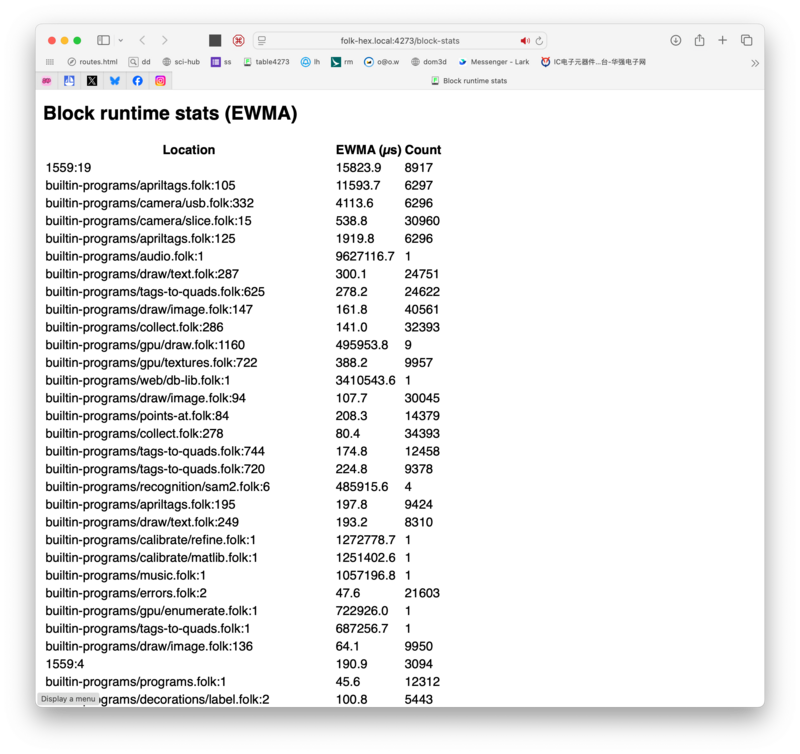
- (you can see that on this system, we spend 4ms (!) on jpeg decode every frame, 10ms on apriltag global decode, etc)
- The intent here is to make it easier to spot-check optimizations without having to break out tracy and scroll around. Just rerun the system and look at the page.
- Checked in the 3D quads web viewer from a few months ago with small fixes (default view down camera barrel, flickering fixes)
- Moved all pure 'userland' library dependencies (libwslay, apriltag) out of the Makefile; discourage future dependencies from getting added to it
- Vendored stb_ds, started using it and rwlocks for various bookkeeping lists and tables that used to be fixed-size where we were crashing or had lots of contention (holds, output redirection)
- Started using -O2 and -march=native for C modules (I want to speed up subimage warp, might need to hand-optimize)
- Text rendering optimizations: make the font object an opaque pointer since we only operate on it from C anyway, so we don't have to reparse it for every text render. Makes text render go from 1ms → 300us.
- Build the shaped text object directly as a string, so we don't need to serialize for every value, also saving a few hundred microseconds I think
- Fixed GPU crashes and warpQuad out-of-bounds when holding page in weird orientation (allocating way too big an image)


Default calibration
Omar: I've wanted better laptop testing, and you obviously can't projector-camera calibrate on a laptop or other monitor, even though you do have a webcam and a display.
I also want a nicer setup experience where you can start playing with Folk immediately, without having calibrate it. You put pages down and outlines appear, move pages around and they move, etc.
Here's how setup and a basic program look on my laptop (with an AI-generated macOS camera driver that I should upload sometime, but it's pretty easy to generate), but it also works on table:


Starvation bug on smaller system
Omar: On my home system, I've had issues where -atomically blocks start missing and camera slice / other animations slow to a crawl or just stop working, even while the rest of the system still works.

I think this is starvation because camera slice is surprisingly slow, so its statements appear after the block has already been running for 1ms → go to the global queue, and then global queue gets overfull and never runs before the statement is invalidated by the next frame.
Fixed with this hack where we just always use local queues, but that feels also not-optimal.
Why is camera slice so slow on my home system? JPEG decompression and dewarping!


Realized that it was a bad move to do JPEG-space crop and decompression for each slice – it's almost as slow as a full decompress – should go back to doing the full decompress for every camera frame and then putting the raw color frame in a statement. But this adds a lot of latency, because it takes a few ms (!) to do a full decompress, so now we decompress both gray and RGB in parallel.


I feel like we can do more here – reduce rest-of-system latencies, use hardware-accelerated JPEG decoding, whatever. There shouldn't be a 2ms difference between gray decode and RGB decode, and a 2ms difference shouldn't wreck system throughput.
Multi-projector support
With the new studio, we want to make a bigger table that has 2 projectors connected to one PC. Folk doesn't support that right now – the whole gpu/draw driver has been parameterized by a single display's parameters – so have been slowly refactoring and untangling it, and updating the setup.folk UI to let you check multiple displays.
Outreach
Open house
- We hosted our first open house at the new studio, which is on the border between Williamsburg and Greenpoint. It was a small open house, but it was nice to have people come by to see the new space (and force us to have something minimal running).


In April
- RSVP for the Folk open house on Monday, April 27, at our new studio in Williamsburg.